
Get your Bot ID
Get your Bot ID from the access instructions associated with your Patreon membership. If the ID is missing or rejected, contact the creator on Patreon; this website does not issue Bot IDs.
Open Travian and enter your Bot ID
Open Travian, log in and refresh the game page after installing the extension. Open TravAI from Chrome’s Extensions menu; you can pin it to the toolbar.
Choose Turkish or English when asked. Enter the Bot ID provided with your access. If the bot cannot read your villages, refresh the game page and reopen its window.
Current bot interface
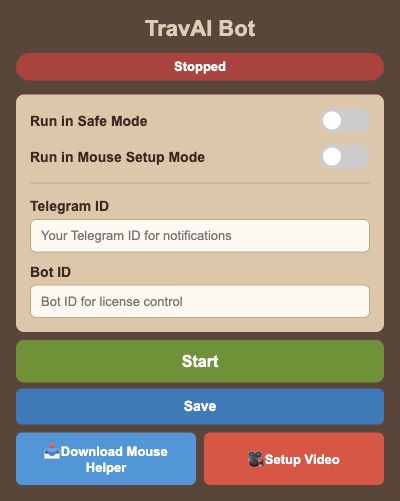
Rendered from the English interface with sample settings. This is not a live game session.
Open the full-size screenPrepare Mouse Helper when required
For Safe Mode or hero oasis raids, use Download Mouse Helper at the bottom of the bot window. The current link opens a Windows .exe package.
Start the helper on a compatible system and follow the existing Setup Video for the mouse-specific setup. Then enable Run in Safe Mode in TravAI and keep the helper running. The linked video is in Turkish.
Save, start and check
Choose the tasks you want to use, then press Save to store the settings. Press Start to run the bot; the button changes to Stop while it is running.
Keep the computer, Chrome and game session open. Check the recent action history, and use Stop when you want to end the run. Use the task guides below to configure each routine.
Questions and troubleshooting
Do I need to extract the ZIP?
No. Drag the current ZIP directly onto Chrome’s Extensions page with Developer mode enabled.
I dropped the ZIP but cannot see the extension. What should I check?
Make sure chrome://extensions/ is open in Google Chrome and Developer mode is enabled. Drop the downloaded ZIP directly onto that page.
Why are my villages missing?
Keep your logged-in Travian page open, refresh it after installation, then close and reopen the TravAI window so it can read the village information.
Safe Mode reports that the mouse program is not running.
Open the current Mouse Helper program on a compatible system, follow the Setup Video and start TravAI again. The helper must remain running for Safe Mode.
Where can I get or check my Bot ID?
Use the access instructions associated with your membership. If the ID is missing or rejected, contact the creator through Patreon; this website does not generate license IDs.