
Farm lists
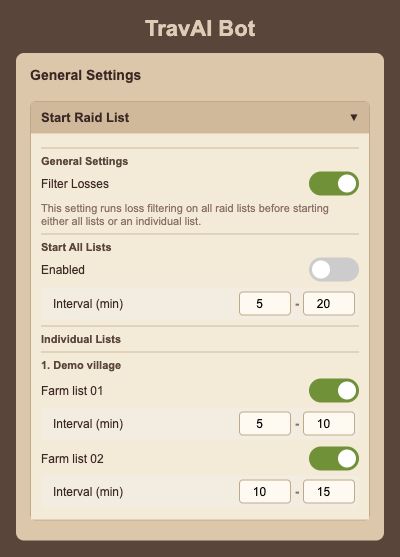
Select your existing lists, set their intervals, and enable the optional loss filter.
TravAI / Travian bot
Send your farm lists. Develop your villages. Send your hero on adventures. Manage recurring game tasks with the settings you choose.
See what it doesChrome extension · Your computer and game session stay open.
Inside the bot / Farm lists
Your lists. Your intervals.
Your daily game routine
Select your existing lists, set their intervals, and enable the optional loss filter.
Configure resource fields, buildings, and troop training for your villages.
Choose the adventures, level points, and oasis raiding settings you need.
Oasis raiding requires Safe Mode and Mouse Helper.
Getting started
Access is on Patreon. Setup steps are in the existing guide. You choose which features to run.
FAQ
Yes. TravAI runs through a desktop Chrome extension. Keep your computer, browser and game session active while it works. Remote control connects to the running bot; it does not move the bot to the cloud.
Install the TravAI Chrome extension using the linked guide. Safe Mode uses the companion Mouse Helper; some features, including hero oasis raids, require it to be running.
The TravAI bot interface currently supports English and Turkish. This website is available in English, Italian, Spanish and Turkish.