
TravAI / Features
What can TravAI do?
Manage farm lists, village development and hero tasks with TravAI, a Travian farming bot focused on careful use. Fit Mouse Helper Safe Mode and the advanced AI decision tree to your own game routine.
AI chooses the task. Mouse Helper clicks.
TravAI is developed with the aim of keeping the risk of account penalties as low as possible. Mouse Helper Safe Mode performs on-screen clicks through the mouse application, while an advanced AI decision tree selects the next suitable task. Farm list automation, village development and hero tasks work together with your settings.
AI that considers your current game situation
TravAI’s AI decision tree evaluates resources, building and training queues, farming settings and the hero’s status. It selects a suitable task from the features you enabled and waits when no task is ready. You choose your game plan and which features run.
Safe Mode with Mouse Helper
When Safe Mode is enabled, the bot’s clicks are performed with the mouse through Mouse Helper on your computer. TravAI stops if the helper cannot respond. Complete the setup, then manage farm lists and other automation with your own settings.
Looking for the safest Travian bot?
TravAI’s approach to careful, controlled use brings four practical features together:
Mouse control with Mouse Helper
With Safe Mode enabled, clicks are performed through the Mouse Helper application on your computer.
Suitable tasks selected by AI
Resources, queues and the hero’s status are evaluated to select the next suitable task according to your settings.
Helper availability checks
TravAI stops if Mouse Helper cannot respond.
Your settings and action history
You choose which features run and when to take breaks, and follow completed tasks in the action history.
Farming & raid lists
Build a farming routine around the lists you already use.
- Selected lists or start all
- Per-list interval ranges
- Optional loss filtering
Example use
Select two existing farm lists in a village and give each its own sending interval. You can also choose to run all lists together.
Requirements and scope
Automates existing farm lists; it does not create new targets.
Current bot interface
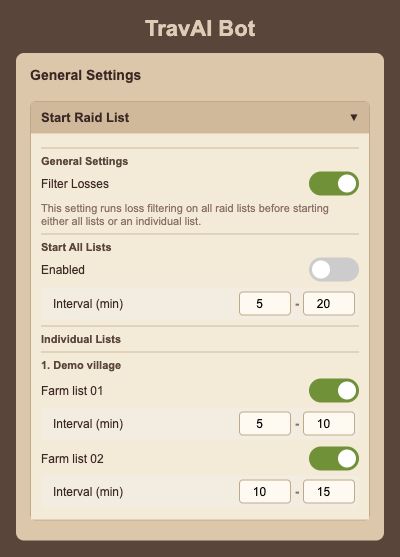
Rendered from the English interface with sample settings. This is not a live game session.
Open the full-size screenVillage development
Bring everyday construction into one manageable routine.
- Resource field upgrades
- Building construction and upgrades
- Per-village settings and automatic development
Example use
Choose which resource types to develop in one village while using different construction settings in another.
Current bot interface
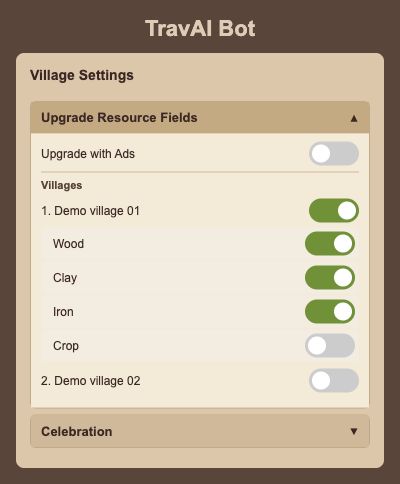
Rendered from the English interface with sample settings. This is not a live game session.
Open the full-size screenTroops & training
Keep recruitment and army upkeep in motion.
- Barracks, Stable and Workshop training
- Great Barracks and Great Stable support
- Training queue targets, healing and Smithy upgrades
- Hero equipment before training
Example use
Choose the villages and buildings where you want to train troops, then set your training queue targets. Leave unused training options off.
Requirements and scope
Training, healing and upgrades require the relevant in-game buildings and resources.
Resource management
Make better use of the resources available to your villages.
- NPC exchange and resource distribution settings
- Resources from the hero inventory
- Automatic resource support between villages
Example use
Choose which villages send and receive resource support. Use available resources and the hero inventory to support development.
Requirements and scope
NPC exchange and resource use are subject to the normal in-game access, Gold and resource requirements.
Hero routines
Give your hero more opportunities to contribute.
- Adventures and level-up point allocation
- Oasis raids, solo or with troops
- Health-aware target selection and ointment use
Example use
Enable adventures and choose how level-up points are allocated. You can also use oasis raiding with the hero alone or with selected troops.
Requirements and scope
Oasis raids require Safe Mode with Mouse Helper.
Current bot interface
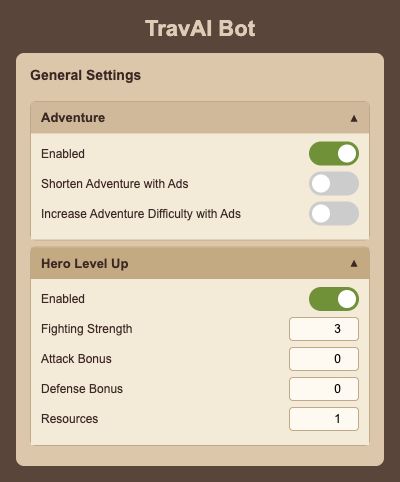
Rendered from the English interface with sample settings. This is not a live game session.
Open the full-size screenEveryday extras
Take a few more repeat tasks off your list.
- Celebrations and task reward collection
- Optional video-ad upgrades and production boosts
- Configurable building completion with Gold
Example use
Add celebrations and task rewards to your daily routine. Enable options that use ads or Gold only when you want them.
Requirements and scope
Game resources, Gold and ad availability still apply.
Resource production boosts through ads require Safe Mode.
Stay in control
Choose your routine and keep an eye on its progress.
- Remote control while the bot is connected
- Work and break settings
- Action history
- Settings backup and restore
Example use
Configure the tasks you want to run, follow completed actions in the history, and back up your settings to restore them later.
Requirements and scope
Remote control requires the bot, your computer and your game session to remain running.
Telegram notifications
Stay informed about events that need your attention.
- Incoming attacks and full storage
- Critical crop levels
- Unread messages
Example use
Choose the Telegram alerts you want for incoming attacks, full storage, critical crop levels or unread messages.
Requirements and scope
Incoming attack notifications require Travian Plus.
FAQ
Questions about the features
Can I choose which features to use?
Yes. Select the routines you want, configure supported features per village and choose your farm lists and sending intervals. You do not have to enable every feature.
Are there any in-game requirements?
The game’s usual requirements still apply. Farm-list automation needs existing usable lists, incoming attack notifications require Travian Plus, and NPC exchange or Gold completion uses the relevant in-game features and resources. Video-ad features depend on availability.
How do I get TravAI?
Visit the Trav Game Bots membership page on Patreon for current plans, access instructions and support. Prices and membership details are kept there.
How does TravAI approach the risk of account penalties?
TravAI combines Safe Mode, Mouse Helper and an advanced AI decision tree with the aim of keeping penalty risk as low as possible. Some of our users have renewed their membership every month for six months. You choose which features run and follow completed tasks in the action history.
Choose the tasks that fit your game.
Current access and membership details are on Patreon. Follow the existing guide for installation steps.